
요즘 블로그가 굉장히 뜸했다

앱 하나 만들어보고 싶어져서 퇴근하고 짬짬이 개발하느라 포스팅할 여유가 없는 것도 한몫하고 있다
앱을 만들고 나니 문의 메일을 받게 됐는데 알림이 안오니까 매번 메일함 들어가는 것도 일이더라...
오늘은 Google의 Apps Script 기능을 이용해서 간단하게 특정 메일이 오면 알림을 받아보겠다
1. 디스코드 웹훅
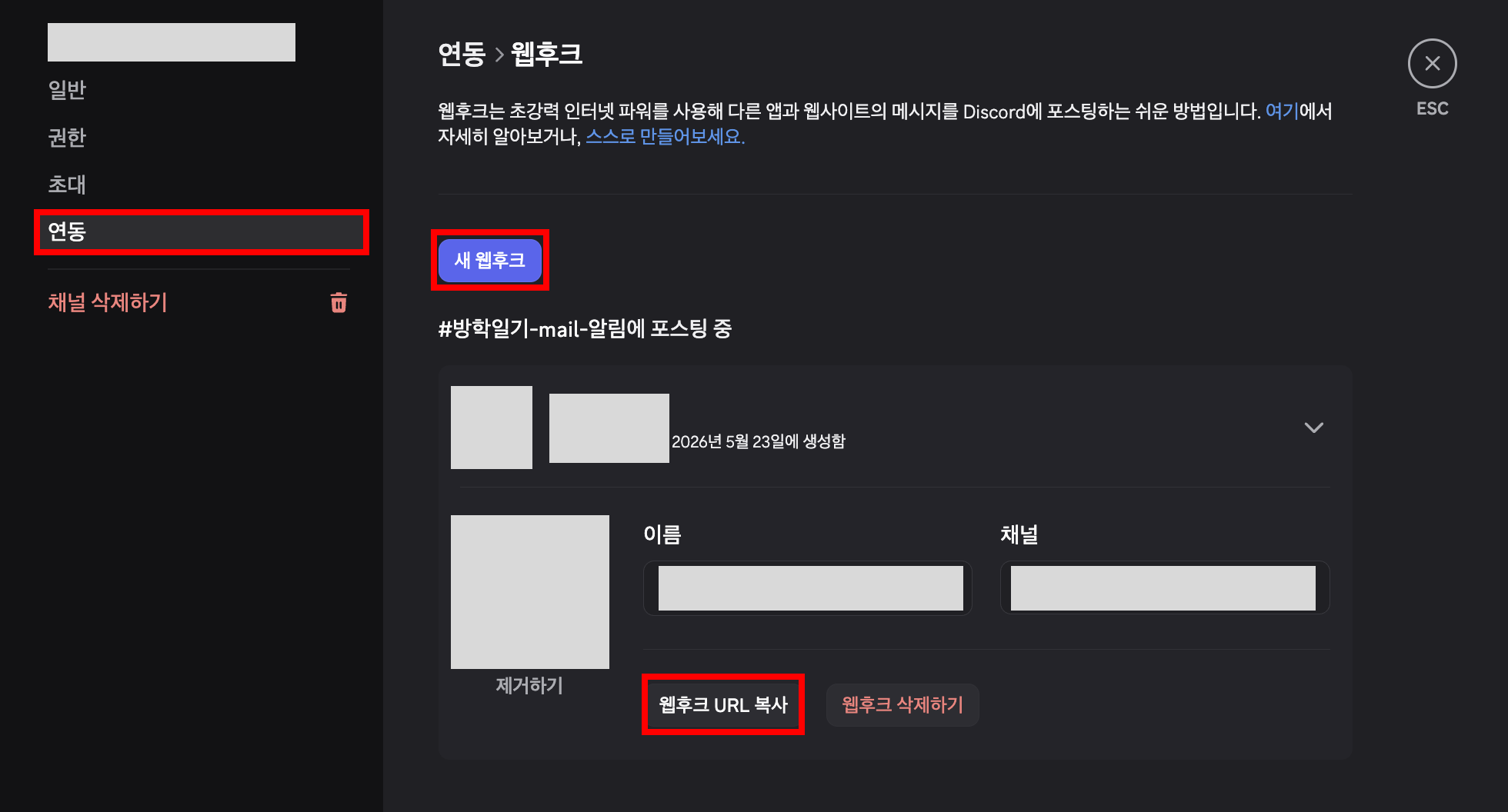
- 우선 디스코드 웹훅을 준비한다
- (알림을 받을) 디스코드 채널 - 채널 편집 (톱니) - 연동 - 웹후크
2. Google Apps Script 접속
- 아래 페이지 접속해서 스크립트 하나 새로 만들어주면 된다
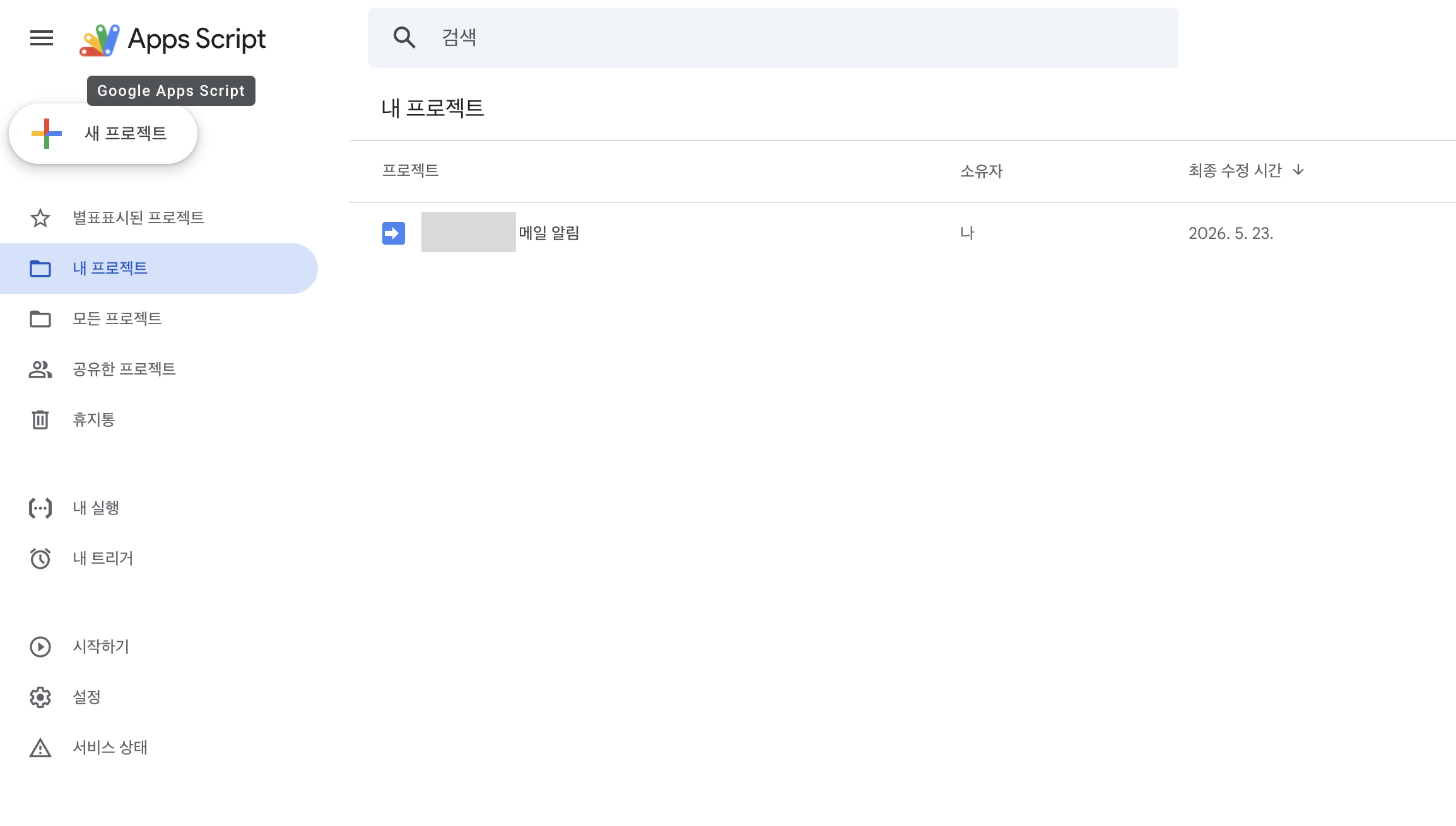
https://script.google.com/home
Apps Script | Google for Developers
간편하게 고품질 클라우드 기반 솔루션을 개발하세요.
developers.google.com
3. 스크립트 작성
- 아래 스크립트는 다음과 같이 기능한다
- Gmail에서 읽지 않은 메일 중 제목에 [문의] 키워드가 포함되고,
- 최근 1일 이내이며
- discord-notified 라벨이 없는 메일을 찾는다
- 찾은 메일의 발신자, 제목, 수신 시간, 본문 미리보기 300자를 정리
- Discord Webhook으로 알림을 보낸다
- Discord 전송이 성공하면 해당 Gmail 스레드에 discord-notified 라벨을 붙여서 같은 메일에 대해 중복 알림이 가지 않게 한다
const DISCORD_WEBHOOK_URL = '<디스코드 웹훅 URL>';

function parseSender(from) {
  const emailMatch = from.match(/<([^>]+)>/);
  const plainEmailMatch = from.match(/[a-zA-Z0-9._%+-]+@[a-zA-Z0-9.-]+\.[a-zA-Z]{2,}/);

  const email = emailMatch ? emailMatch[1] : plainEmailMatch ? plainEmailMatch[0] : from;

  let name = from
    .replace(/<[^>]+>/g, '')
    .replace(email, '')
    .replace(/"/g, '')
    .trim();

  return {
    name: name || '',
    email: email
  };
}

function formatSender(from) {
  const sender = parseSender(from);

  if (sender.name) {
    return `${sender.email} (${sender.name})`;
  }

  return sender.email;
}

function checkGmailAndNotify() {
  const labelName = 'discord-notified';
  let label = GmailApp.getUserLabelByName(labelName);

  if (!label) {
    label = GmailApp.createLabel(labelName);
  }

  // 제목에 '문의'가 들어간 안 읽은 메일 중 아직 알림 안 보낸 것만 검색
  const threads = GmailApp.search(
    'is:unread subject:문의 -label:discord-notified newer_than:1d'
  );

  threads.forEach(thread => {
    const messages = thread.getMessages();
    const lastMessage = messages[messages.length - 1];

    const from = formatSender(lastMessage.getFrom());
    const subject = lastMessage.getSubject();
    const date = lastMessage.getDate();

    // 본문 미리보기: 너무 길면 디스코드 메시지가 지저분해져서 300자만
    const plainBody = lastMessage.getPlainBody() || '';
    const snippet = plainBody
      .replace(/\s+/g, ' ')
      .trim()
      .slice(0, 300);

    const content =
      `## ✉️ **새 문의 메일 도착!** ✉️\n\n` +
      `**계정 :** ${from}\n` +
      `**제목 :** ${subject}\n` +
      `**시간 :** ${formatDate(date)}\n\n` +
      `**-- 내용 미리보기 --**\n` +
      `${snippet || '(본문 없음)'}\n\n` +
      `-----------------------------------------------`;

    const success = sendDiscordMessage(content);

    // 디스코드 전송 성공한 경우에만 중복 방지 라벨 추가
    if (success) {
      thread.addLabel(label);
    }
  });
}

function sendDiscordMessage(content) {
  const payload = {
    username: 'Gmail 알림봇',
    content: content
  };

  const response = UrlFetchApp.fetch(DISCORD_WEBHOOK_URL, {
    method: 'post',
    contentType: 'application/json',
    payload: JSON.stringify(payload),
    muteHttpExceptions: true
  });

  const statusCode = response.getResponseCode();

  // Discord Webhook 성공 응답은 보통 204
  return statusCode >= 200 && statusCode < 300;
}

function formatDate(date) {
  return Utilities.formatDate(
    date,
    'Asia/Seoul',
    'yyyy-MM-dd HH:mm:ss'
  );
}
3. 트리거(trigger) 등록
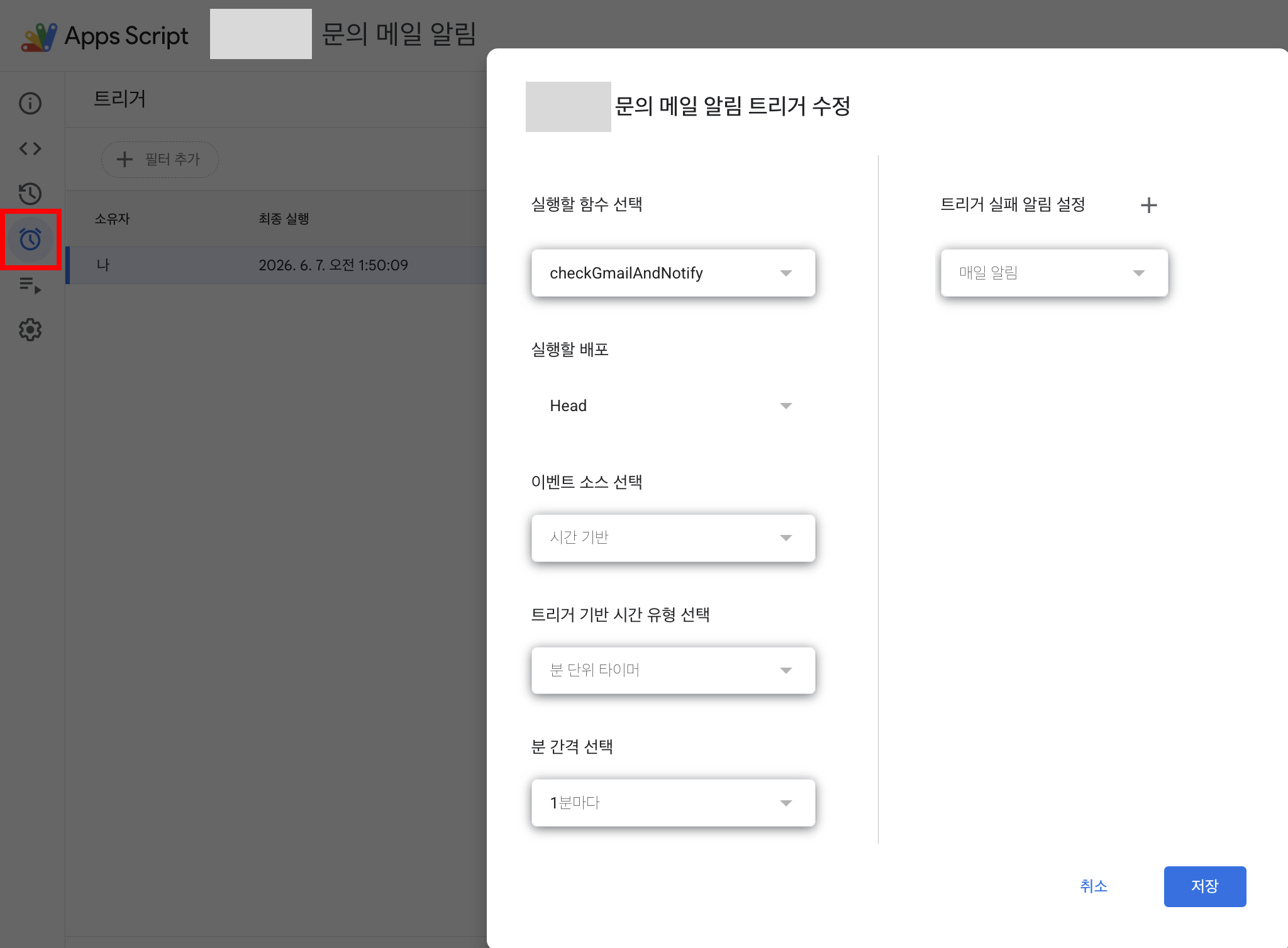
- 스크립트가 실행될 트리거가 필요하다
- 나는 매 분마다 이메일 리스트를 체크하는 트리거를 만들기 위해 아래처럼 세팅했다
- 좌측의 트리거 아이콘 클릭
- 실행할 함수 : 우리가 만든 함수 이름
- 이벤트 소스 선택 : 시간 기반
- 트리거 기반 시간 유형 선택 : 분 단위 타이머
- 분 간견 선택 : 1분마다
4. 저장 후 테스트
- 저장하고 이메일 제목에 '문의'를 넣어서 보내면 아래처럼 알림이 온다
- 그리고 discord 태그가 달림으로써 이미 알림을 보낸 메일은 중복되지 않는다


반응형
'Infra > DevOps' 카테고리의 다른 글
| FreeDNS 자동 갱신 컨테이너 만들기 (feat. 스크립트) (0) | 2026.03.30 |
|---|---|
| 쿠버네티스(Kubernetes, K8s) 실험 일지 (feat. 튜닝 및 방향성에 대한 고찰) (1) | 2025.12.25 |
| 맥북에서 VPN 사용 시 주의할 점 (feat. WireGuard) (0) | 2025.12.12 |
| iptable-nft 환경에서 VPN 서버 구축하기 (feat. WireGuard) (0) | 2025.12.12 |
| Flannel이란? (feat. 쿠버네티스, Kubernetes, K8s) (2) | 2025.12.07 |